Freedom of belief is a human right
A voice for Said.
A moment of your time.
Help bring attention to the case of Said Abdelrazek, an Egyptian Christian convert detained and put on trial over his religious beliefs, according to Amnesty International.
Choose an email linkYou choose the recipient. You review the words. You send.

A few minutes, a considered message
How to help
- 01
Choose your contacts
Browse officials, journalists and human rights groups. Copy addresses individually, by group or all at once.
- 02
Open a ready-made draft
One click opens your email app with the recipient, subject and message filled in.
- 03
Make it yours, then send
Add your name and personal words in your email app. Review everything before sending.
Turn concern into a clear request
Prepare your appeal
Choose a contact or copy an address list. Each email link opens a draft in your default email app. Enter your name below to update every draft, then add any personal words and review in your email app before sending.
Updates the signature in every template and email link as you type. Your name stays in this page’s memory and is not sent to this website or saved by it. Your browser may offer its own autofill.
Directory checked 19 October 2026. Contacts are ordered by relevance to the case, not guaranteed responsiveness. No public case coverage was found for the listed journalists and human rights groups in the checked sources; they may already be involved privately. Publicly listed addresses have not been delivery-tested.
View address list
Copies a comma-separated list for your email app, including BCC if you choose. Contact-form-only entries are excluded.
If your email app does not open or leaves out text, expand “View & copy template” and copy it into a new message. Email links do not send automatically. Your email account’s sender identity will be visible when you send.
Your email, your choice
Open an individual draft, or copy addresses and template text to use in your own email app. You control the recipients, wording and sending.
Be clear about what is known
Attribute allegations to the sources. Don’t claim an execution is scheduled, speculate about motives, or speak on behalf of the family. Check for new developments before sending.
Privacy, without promises
This site does not save supporter information. The optional name field updates drafts locally in your browser. Your draft opens in your own email app. There are no analytics or external scripts. The hosting provider may keep access logs; this is not an anonymity service.
Start with the evidence
Sources & existing efforts
Use these organisations’ own reporting and instructions. This site is an independent supporter resource and is not affiliated with them.
Using Gmail in Chrome? Set up one-click email drafts
Optional setup for Chrome on a desktop computer. This lets email links opened in Chrome create a Gmail draft. You still review and send the message yourself.
Allow sites to ask
Copy
chrome://settings/handlers, paste it into Chrome’s address bar and press Enter. This is a browser settings address, so it cannot open as a normal website link.Select Sites can ask to handle protocols. If mail.google.com appears under Not allowed to handle protocols, remove only that Gmail entry. Leave unrelated entries alone.
Let Gmail open email links
Open Gmail in the same Chrome profile and sign in. Reload Gmail if needed. Click the overlapping-diamonds icon on the right of the address bar. Choose Allow, then Done.
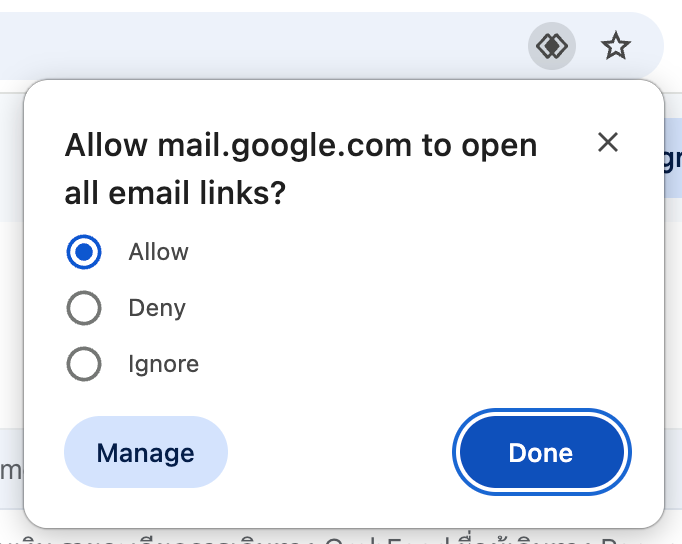
Choose Allow in Gmail’s email-link permission prompt, then Done. Select the image to view it full size. Check the result
Return to
chrome://settings/handlers. Under email, find mail.google.com. If it is not already marked Default, open its three-dot menu and choose Make default. Verify that Default appears beneath mail.google.com, then return here and try a Send Email link.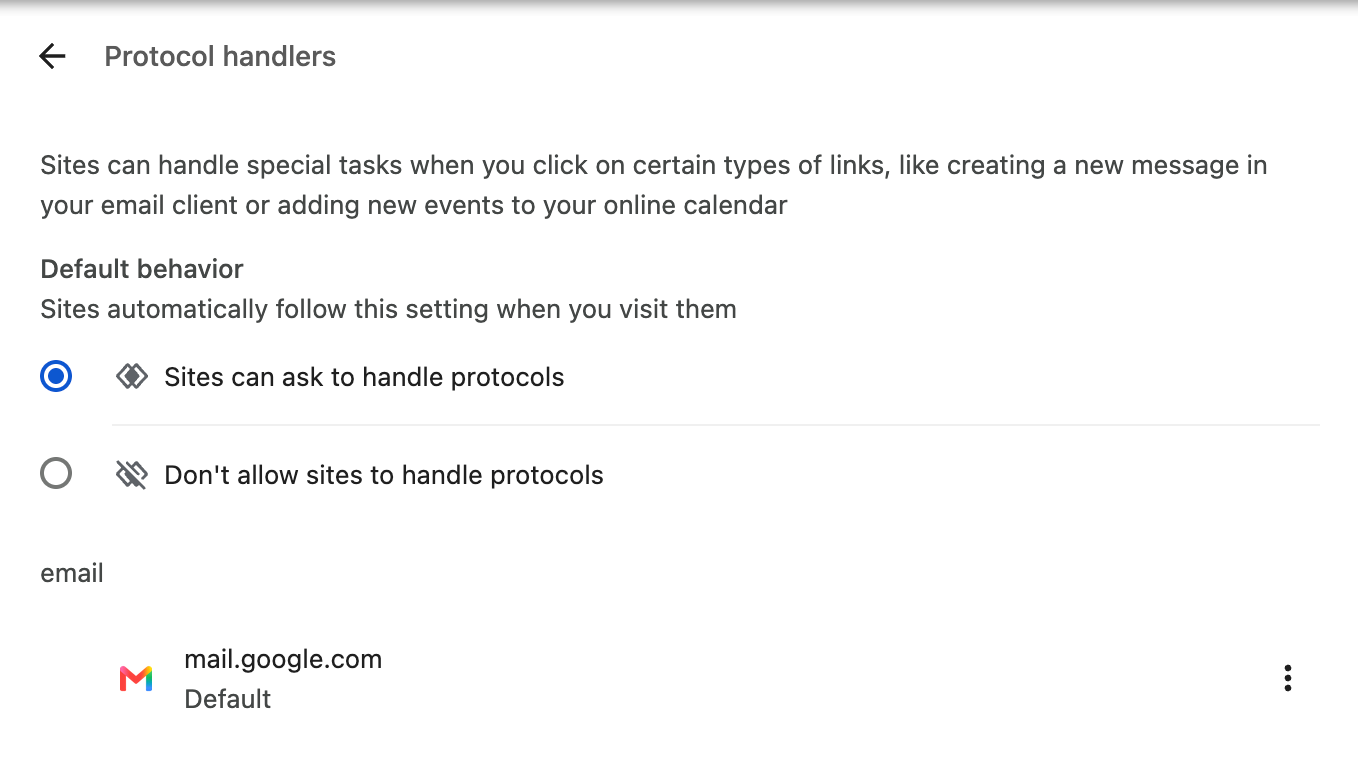
Gmail is ready when Default appears beneath mail.google.com. Use its three-dot menu to choose Make default if needed.
These steps apply to links opened in Chrome. Links from other apps may also depend on your operating system’s default browser and email-app settings. On a work or school computer, an administrator may control these settings. If the icon is missing or a draft does not open, you can still use the copy-address and copy-template buttons on this page.
Reference: Google Chrome’s site-permission guide and Chrome’s explanation of Gmail email-link handlers. Menu wording can vary by version.